 Anand Krishnamoorthi
86b4a279fa
Anand Krishnamoorthi
86b4a279fa
* fix(ffi): eliminate aliasing UB via to_shared_ref migration

Add to_shared_ref() helper that creates &T (shared reference) from raw
pointers instead of &mut T. This eliminates undefined behavior caused by
violating Rust's aliasing invariant when C# SafeHandle permits concurrent
FFI calls on the same handle.

With &mut T, the compiler may assume exclusive (noalias) access and
reorder or elide reads/writes — a miscompilation risk when another thread
holds a reference to the same object. Switching to &T removes that
assumption; actual mutation is mediated by the interior RwLock inside
Handle<T>, which is the sole synchronization mechanism.

Migrated sites:
- rvm.rs: 20 non-drop call sites
- engine.rs: 30 non-drop call sites + with_unwind_guard for timer fns
- compiled_policy.rs: 2 call sites
- Fix null-data UB in regorus_program_deserialize_binary

Drop paths retain to_ref() where exclusive access is guaranteed by the
caller contract (preventing use-after-free).

Co-authored-by: Copilot <223556219+Copilot@users.noreply.github.com>

* feat(ffi): add Azure Policy JSON compilation FFI and C# bindings

- AliasRegistry builder pattern: RegorusAliasRegistryBuilder (mutable,
  single-threaded) + RegorusAliasRegistry (immutable, Arc-wrapped)
- Azure Policy JSON compilation: regorus_compile_azure_policy_rule and
  regorus_compile_azure_policy_definition with alias registry support
- regorus_rvm_set_context for host-supplied ambient data
- C# AliasRegistryBuilder and AliasRegistry classes with convenience
  factories (FromJson, FromManifest, Empty)
- C# AzurePolicyCompiler static class for policy rule/definition compilation
- Compile functions take *const RegorusAliasRegistry (read-only via
  to_shared_ref for concurrent compilation safety)
- Fix pre-existing clippy warnings across multiple crates

Co-authored-by: Copilot <223556219+Copilot@users.noreply.github.com>

---------

Co-authored-by: Copilot <223556219+Copilot@users.noreply.github.com>
Regorus CSharp
Regorus is
- Rego-Rus(t) - A fast, light-weight Rego interpreter written in Rust.
- Rigorous - A rigorous enforcer of well-defined Rego semantics.
See main Regorus page for more details about the project.
Building
Github Actions
The simplest way to build a Nuget for Regorus' C# bindings is to use Github Actions. The action to do so is named bindings/csharp and is defined in .github/workflows/test-csharp.yml.
There are two ways to trigger a Nuget build.
- Runs are triggered automatically whenever a push or pull request is made to the
mainbranch. - A run can be triggered manually by navigating to the action in the Github UI and clicking
Run workflow. This option allows you to generate a Nuget for any branch, which is useful when testing the integration of in-progress changes to Regorus with other projects. Nuget files that are generated via this flow will have amanualtriggersuffix appended to their version number, making it easy to distinguish them from Nugets generated using themainbranch.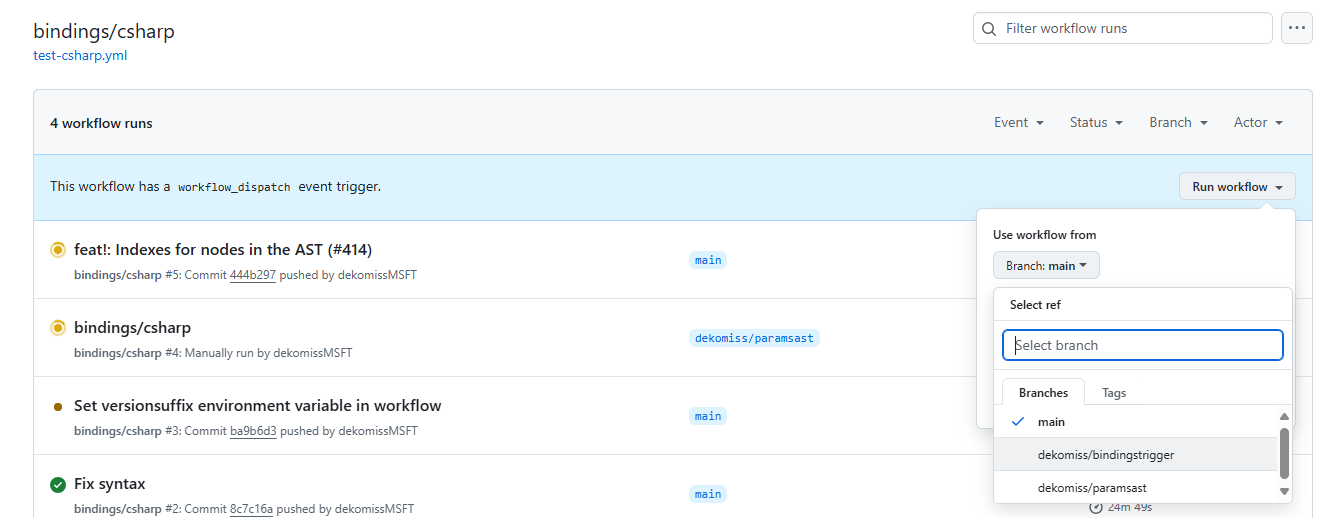

Once the workflow run completes, the generated Nuget can be downloaded by following these steps:
- Open the run.
- Click on
Build Regorus nugeton the left. - Expand the
Upload Regorus nugetstep. - Click the
Artifact download URLlink at the bottom. - Save and extract the downloaded zip file to find the
.nupkgfile.

Local
The cargo xtask runner provides helpers for local builds:
cargo xtask ffibuilds thebindings/fficrate for the host platform in debug mode. Add--target <triple>(repeatable) to cross-compile, or--releaseto produce optimised artefacts. Results land underbindings/ffi/target/<triple>/<profile>.cargo xtask nugetreuses those artefacts to pack the C# library. It defaults to debug builds for the host but accepts--target,--release,--artifacts-dir <path>to reuse existing binaries, and--enforce-artifactsto require every officially supported platform.cargo xtask test-csharpensures a NuGet is available (rebuilding when required or when--force-nugetis passed) and then runsRegorus.Tests,TestApp, andTargetExampleAppagainst it. The command accepts the same build flags ascargo xtask nuget.
Memory Usage Safeguards
The C# bindings expose allocator-backed memory tracking utilities via the static Regorus.MemoryLimits helper. Typical usage:
// Restrict total allocations to 128 MiB for the process
Regorus.MemoryLimits.SetGlobalMemoryLimit(128 * 1024 * 1024);

// Optional: tune how frequently each thread flushes its allocation counters
Regorus.MemoryLimits.SetThreadFlushThresholdOverride(256 * 1024);

// Engine operations throw InvalidOperationException with the allocator message if the budget is exceeded
using var engine = new Regorus.Engine();
var veryLargeJson = new string('x', 128 * 1024);
try
{
    engine.SetInputJson(veryLargeJson);
}
catch (InvalidOperationException ex)
{
    Console.WriteLine($"Allocator reported: {ex.Message}");
}

// Restore defaults once done
Regorus.MemoryLimits.SetGlobalMemoryLimit(null);
Regorus.MemoryLimits.SetThreadFlushThresholdOverride(null);
See bindings/csharp/Regorus.Tests/RegorusTests.cs for scenario coverage and bindings/csharp/TargetExampleApp/Program.cs for end-to-end usage.
RVM Usage Example
The RVM API lets you compile a program from modules/entrypoints and execute it in a VM:
using Regorus;

const string Policy = """
package demo
default allow = false
allow if {
  input.user == "alice"
  some role in data.roles[input.user]
  role == "admin"
}
""";

const string Data = """
{ "roles": { "alice": ["admin"] } }
""";

const string Input = """
{ "user": "alice" }
""";

var modules = new[] { new PolicyModule("demo.rego", Policy) };
var entryPoints = new[] { "data.demo.allow" };

using var program = Program.CompileFromModules(Data, modules, entryPoints);
var listing = program.GenerateListing();

using var vm = new Rvm();
vm.LoadProgram(program);
vm.SetDataJson(Data);
vm.SetInputJson(Input);

var result = vm.Execute();
Console.WriteLine($"allow: {result}");
Azure RBAC Condition Evaluation
Evaluate Azure RBAC condition expressions directly with a JSON evaluation context:
using Regorus;

const string Condition = "@Resource[owner] StringEquals 'alice'";
const string ContextJson = """
{
  "principal": {
    "id": "user-1",
    "principal_type": "User",
    "custom_security_attributes": {}
  },
  "resource": {
    "id": "/subscriptions/s1",
    "resource_type": "Microsoft.Storage/storageAccounts",
    "scope": "/subscriptions/s1",
    "attributes": {
      "owner": "alice",
      "confidential": true
    }
  },
  "request": {
    "action": "Microsoft.Storage/storageAccounts/read",
    "data_action": null,
    "attributes": {
      "clientIP": "10.0.0.1"
    }
  },
  "environment": {
    "is_private_link": null,
    "private_endpoint": null,
    "subnet": null,
    "utc_now": "2023-05-01T12:00:00Z"
  },
  "action": "Microsoft.Storage/storageAccounts/read",
  "suboperation": null
}
""";

var allowed = RbacEngine.EvaluateCondition(Condition, ContextJson);
Console.WriteLine($"RBAC condition allowed: {allowed}");
Azure Policy JSON Evaluation
Compile and evaluate Azure Policy JSON policyRule definitions directly — no Rego translation required.
The AzurePolicyCompiler compiles JSON policy rules into RVM programs that can be executed with the Rvm engine.
using Regorus;

// 1. Load alias definitions for the resource provider
const string AliasesJson = """
[{
    "namespace": "Microsoft.Storage",
    "resourceTypes": [{
        "resourceType": "storageAccounts",
        "aliases": [{
            "name": "Microsoft.Storage/storageAccounts/supportsHttpsTrafficOnly",
            "defaultPath": "properties.supportsHttpsTrafficOnly",
            "paths": []
        }]
    }]
}]
""";

using var registry = AliasRegistry.FromJson(AliasesJson);

// 2. Compile a JSON policy rule (the native Azure Policy language)
const string PolicyRule = """
{
    "if": {
        "allOf": [
            { "field": "type", "equals": "Microsoft.Storage/storageAccounts" },
            { "field": "Microsoft.Storage/storageAccounts/supportsHttpsTrafficOnly", "equals": false }
        ]
    },
    "then": { "effect": "deny" }
}
""";

using var program = AzurePolicyCompiler.CompilePolicyRule(registry, PolicyRule);

// 3. Normalize an ARM resource and evaluate
var armResource = """
{
    "type": "Microsoft.Storage/storageAccounts",
    "name": "mystorage",
    "properties": { "supportsHttpsTrafficOnly": false }
}
""";
var envelope = registry.NormalizeAndWrap(armResource);

using var vm = new Rvm();
vm.LoadProgram(program);
vm.SetInputJson(envelope!);

var result = vm.ExecuteEntryPoint("main");
// result: {"effect": "deny"} for non-compliant, "<undefined>" for compliant
Console.WriteLine($"Policy result: {result}");
Context-dependent policies: If your policy uses context functions like
subscription(), resourceGroup(), or requestContext(), you must also set
the VM context separately:
// The context JSON from NormalizeAndWrap is in the input envelope,
// but must also be provided to the VM's ambient context:
vm.SetContextJson(contextJson);
You can also compile full policy definitions (with parameters) using
AzurePolicyCompiler.CompilePolicyDefinition(). See
bindings/csharp/Regorus.Tests/AzurePolicyCompilerTests.cs for comprehensive examples.